
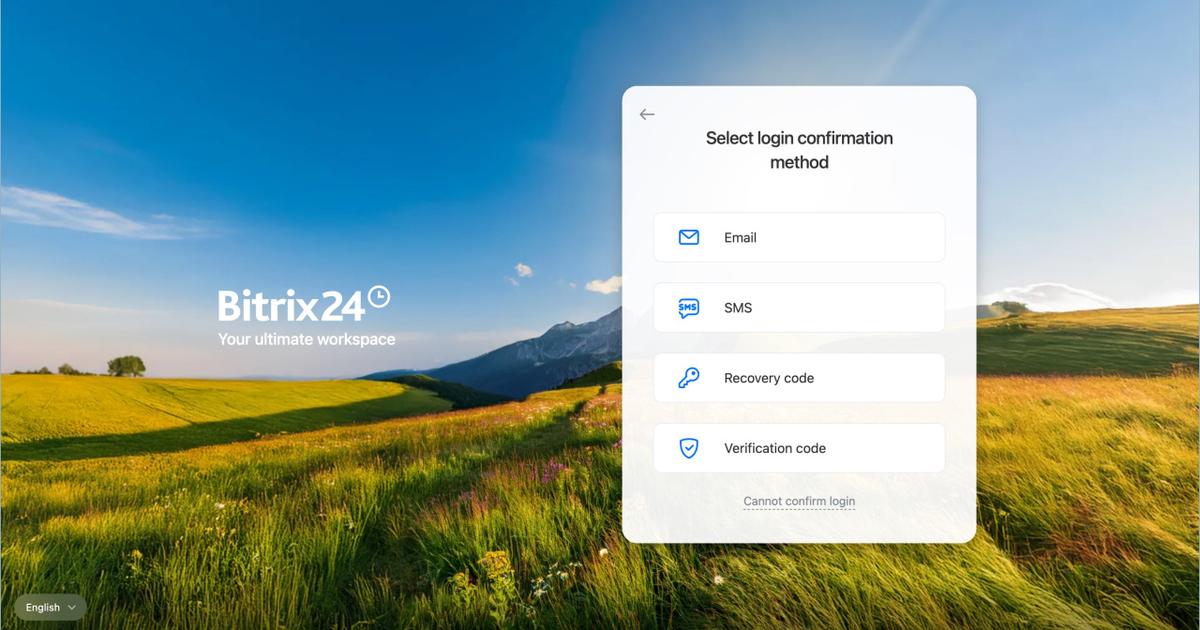
2FA is an approach to login security: a password plus a second, independent way to verify your identity. OTP is just one option for that second factor — a specific technical tool. Starting July 27, 2026, Bitrix24 is rolling out 2FA in stages for the NFR, Enterprise, and Professional plans. The transition period was originally 14 days from activation, but Bitrix24 later extended it — 2FA becomes a mandatory login requirement for all three plans on October 1, 2026.
What’s the difference between 2FA and OTP?
2FA is a security approach, while OTP is one of the tools used to implement it. Think of it the way you’d think about “a lock on your front door” versus “a specific model of lock” — one is the concept, the other is a particular implementation of it.
What is 2FA (two-factor authentication)?
2FA is a general account-protection method that requires you to verify your identity in two different ways to log in, instead of relying on a password alone. The first factor is something you know: your login and permanent password. The second factor is something you have: your phone, a trusted device, access to SMS, or an authenticator app. The point is that even if your password leaks or gets guessed, an attacker still can’t get into the account — they won’t have the second factor.
What is OTP (One-Time Password)?
OTP is one of the technologies used to implement the second factor. It’s a temporary code, usually 6 digits, valid for a single login session — it refreshes every 30 seconds in an authenticator app (such as Google Authenticator or Bitrix24 OTP) or arrives via SMS. In other words, OTP is one specific “key” to the second factor, but not the only possible one: the second factor can also be confirmed in other ways, such as a single tap in a mobile app on a trusted device.
How is 2FA implemented in Bitrix24?
How did the classic OTP-code method work?
Previously, two-factor authentication in Bitrix24 relied specifically on an OTP code from a dedicated app — Bitrix24 OTP or Google Authenticator. Users would enter their login and password, then manually type in a six-digit code from the app. This method is described in detail in Bitrix24’s official guide, «Enable two-step authentication for Bitrix24 login».
How does 2FA work in Bitrix24 today?
2FA in Bitrix24 is now more convenient: instead of manually entering an OTP code, you can confirm a login in a single tap — through the main Bitrix24 mobile app on a trusted device. OTP via SMS or backup codes remain available as alternative access options, for whenever a trusted device isn’t at hand. The new mechanism and setup process are described in Bitrix24’s article «New two-factor authentication in Bitrix24».
In other words, OTP hasn’t gone anywhere — it’s still a working fallback scenario, but it’s no longer the only way to confirm a login.
Why is 2FA becoming mandatory in Bitrix24?
Bitrix24 is soon moving two-factor authentication from a “recommended option” to a “mandatory requirement” — across all regions. Why this matters: 2FA adds a second layer of verification on top of the password, so a leaked or guessed password alone can no longer get an attacker into the account. By making 2FA mandatory, Bitrix24 closes this gap for every account — proactively protecting clients’ data and business operations. Based on the author’s own observations, only around 20% of employees on the client portals he administers actually turn on 2FA before it’s forced on them. This isn’t a formal study — just personal statistics across active clients as of mid-2026 — but the number is telling: most employees don’t enable protection on their own initiative until it becomes a mandatory condition for logging in. That’s exactly why moving 2FA from a recommendation to a requirement is a logical next step.
When does 2FA become mandatory for existing accounts?
| Date | What happens |
|---|---|
| July 27, 2026 | 2FA is enabled for NFR accounts |
| August 3, 2026 | 2FA is enabled for accounts on the Enterprise plan |
| August 10, 2026 | 2FA is enabled for accounts on the Professional plan |
| October 1, 2026 | 2FA becomes a mandatory login requirement for NFR, Enterprise, and Professional — a single unified date for all three plans |
Update from Bitrix24: the transition period was originally 14 days from the date 2FA was enabled on a given account. Bitrix24 later extended the transition period for NFR, Enterprise, and Professional through October 1, 2026, regardless of the exact activation date. For current questions and answers about the transition, see Bitrix24’s official 2FA FAQ.
The Free / Standard / Basic plans are not part of this mandatory rollout — 2FA won’t be force-enabled on these tiers.
What’s the rule for new accounts?
The rule is a little different for accounts purchased after this requirement launches: on the Professional and Enterprise plans, mandatory 2FA is enabled automatically 30 days after purchase, followed by a 14-day transition period, while the Free, Basic, and Standard plans carry no mandatory 2FA requirement at all.
How much time do you get to switch to 2FA?
For accounts on the NFR, Enterprise, and Professional plans, Bitrix24 extended the transition period — it now runs through October 1, 2026, regardless of exactly when 2FA was activated on a given account. Until that date, work continues as usual while 2FA is set up gradually. New accounts purchased after the requirement launched follow a separate mechanism — 14 days from automatic activation (see the section above).
Does the requirement apply to Bitrix24 partners?
For implementation and onboarding specialists (invited Bitrix24 Partners), the new 2FA scheme remains optional. They can keep using their familiar OTP-code setup — this group is not subject to the mandatory enablement requirement.
What practical issues do clients run into when switching to 2FA?
The main difficulties with switching to 2FA don’t usually show up during setup itself — they show up around it, caused by employees’ personal devices, outdated browsers, and quirks of logging in as different profiles on the same computer. Here are the four situations that come up most often.
-
Don’t tie login credentials to an employee’s personal phone or email. In a conflict-driven termination, an employee may not hand over access to their personal phone or email — and then transferring the profile to someone else can take 2–3 days instead of 10 minutes.
-
Login issues are often caused by an outdated browser or mobile OS — and that’s on the client’s side to fix. If a browser or phone firmware hasn’t been updated in a while, 2FA may fail to work, and contacting support doesn’t always help in this case: the fix is on the user’s end, through a software update.
-
A login and password saved in the browser can interfere with logging in after a password change. The same applies to testing: if an admin needs to check the portal as a regular employee, logging in under a second profile on the same computer often fails. The fix is to open the second profile in an incognito window or, more reliably, in a different browser or on a different device, such as a laptop.
-
If the portal’s sign-in start page was changed or removed, login may not work at all. This is easy to avoid by checking the exact login page address in the browser’s address bar ahead of time, rather than relying on a saved bookmark.
What should administrators do right now?
If you administer client accounts or are responsible for their ongoing support, it’s worth working through a few points ahead of time.
- Check the current state. Go through each client account and see whether 2FA is already enabled, and if so, which method is in use (OTP app, SMS, or mobile app confirmation).
- Give clients advance notice. Walk them through the dates in the schedule above and what to expect, based on their plan (NFR / Enterprise / Professional / Free / Standard / Basic) and whether their account is new or existing.
- Make sure no one gets locked out. Help clients, especially admins and key users, set up 2FA before their transition window ends — so they don’t lose access to the portal at the worst possible moment.
- Flag implementation specialists on client teams. They should know that the OTP option remains available to them if they’d rather not switch.
What if a user gets locked out?
If a client or team member runs into trouble logging in after 2FA is enabled, point them to the official support page.
Key takeaways
- 2FA is an approach: two independent verification factors at login.
- OTP is a specific tool for the second factor: a temporary code that’s valid for a single session.
- In Bitrix24, OTP remains a working fallback method, but the primary scenario is now confirming login with a single tap in the mobile app.
- From July 27 through August 10, 2026, 2FA is being rolled out in stages for NFR, Enterprise, and Professional accounts; the transition period was extended — 2FA becomes a mandatory login requirement for all three plans on October 1, 2026.
- Free / Standard / Basic plans aren’t affected by the mandatory requirement.
- In practice, the biggest headaches come not from the 2FA setup itself, but from employees’ personal devices, outdated browsers, and re-logging in as different profiles on the same computer.
- Timely communication with clients now is the best way to avoid access problems later.